Convert bank statement PDFs to CSV,
reconciled row by row.
The parser pulls out every transaction and checks each row against the running balance, all locally inside your browser tab. There's no upload: your statement never reaches our servers.
7 days free · no credit card required · A$11/month incl. GST after, cancel anytime
| Date | Description | Debit | Credit | Balance | ||
|---|---|---|---|---|---|---|
| 01 Jun 2026 | OPENING BALANCE | 2,048.00 | ||||
| 01 Jun 2026 | RENT — AUTOPAY TO LANDLORD.EXE Ref: RENT-JUNE · direct debit paid on time, unlike the hot water | 1,850.00 | 198.00 | |||
| 01 Jun 2026 | GROUNDS OF RECURSION CAFE Card 4242 · see also: coffee | 5.80 | 192.20 | |||
| 02 Jun 2026 | CLOUD STORAGE PLUS — 2TB i.e. someone else's computer | 9.99 | 182.21 | |||
| 02 Jun 2026 | BYTE BAY GROCERS Card 4242 | 54.12 | 128.09 | |||
| 03 Jun 2026 | PAYROLL — INFINITE LOOP INDUSTRIES PTY LTD fortnightly | 3,507.66 | 3,635.75 | |||
| 03 Jun 2026 | STREAMING SERVICE #7 yes, another one | 16.99 | 3,618.76 | |||
| 04 Jun 2026 | RUBBER DUCK EMPORIUM — DEBUGGING SUPPLIES they listen, they judge | 12.99 | 3,605.77 | |||
| 04 Jun 2026 | GROUNDS OF RECURSION CAFE | 5.80 | 3,599.97 | |||
| 05 Jun 2026 | TOWEL WORLD — DON'T PANIC the answer to life, the universe & this line item | 42.00 | 3,557.97 |
Scroll the table sideways for debit, credit and balance →
Where your statement goes
Most PDF converters upload your file to their servers. This one doesn't, the whole parser runs inside your browser tab. Only three things cross the network: your sign-in, a subscription check, and basic usage counts like "42 pages processed". Your files do not leave your computer.
You don't have to take this on trust. Convert a statement with your browser's network tab open and you'll see that no file is ever sent.
Here's a sample statement to try it with, and the CSV it turns into so you can see what you'll get.
Three steps from PDF to spreadsheet
Drop in your statement
Drag in any bank statement PDF, including password-protected files.
Review side by side
The extracted transactions appear next to the original document. The app cross-checks the balances and flags anything that doesn't add up.
Export your CSV
Download a clean CSV with dates, descriptions, debits, credits and balances. Ready for Excel, Google Sheets or your accounting software.
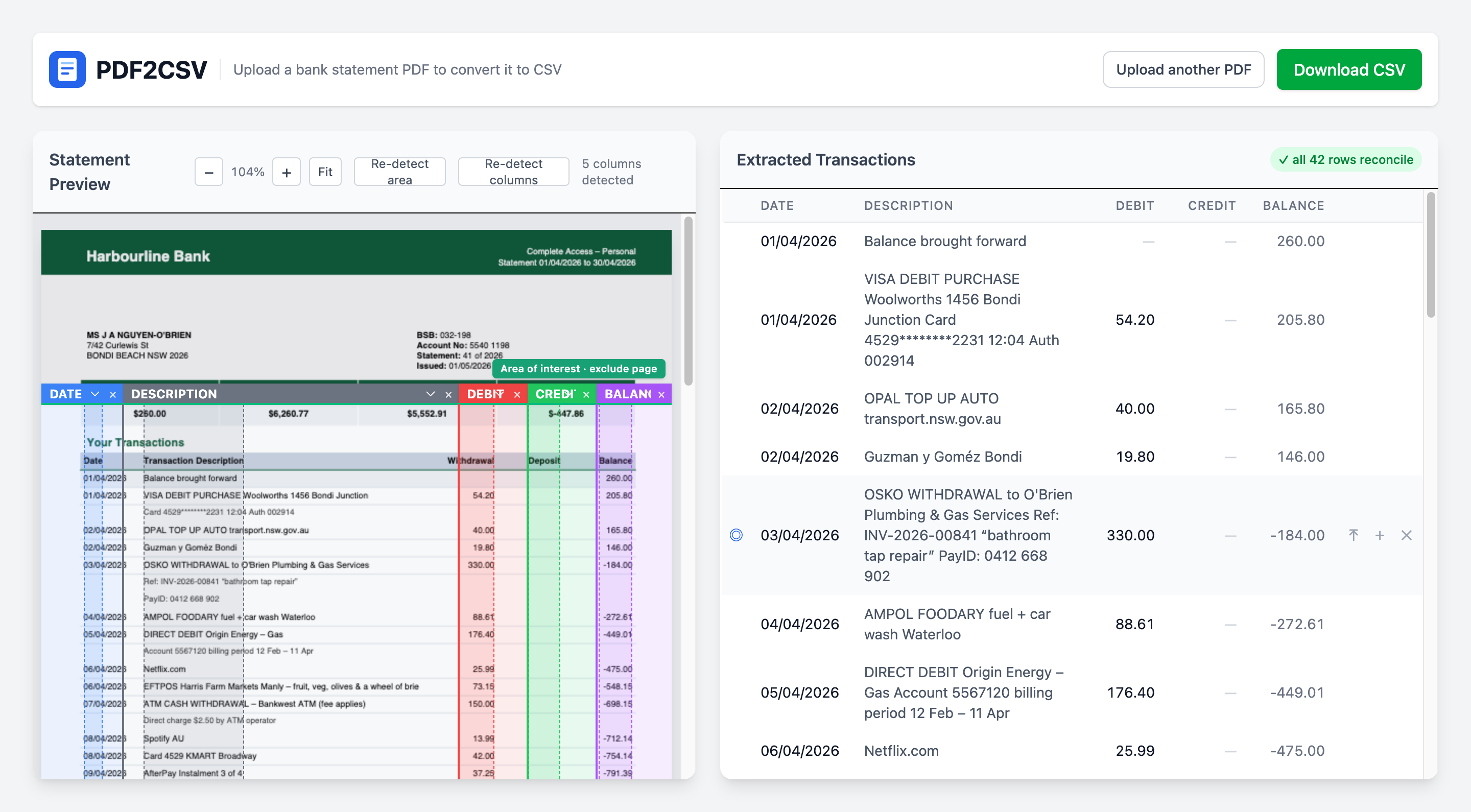
Built for messy, real-world statements
Tuned on real statements from Australian banks: ANZ, CommBank, NAB, Westpac, Bank of Melbourne and more. The layout detection is bank-agnostic, so most tabular statements should just work.
Balances that reconcile
Every row is checked against the running balance, so you know the numbers are right, not just that they were extracted.
Code, not AI
Every number in your CSV is read off the page, not made up. The same statement always gives you the same CSV.
Fix anything in place
Edit a cell, merge split rows, insert a missing one, and the reconciliation check updates as you go.
See where every row came from
Click a transaction and the original PDF scrolls to the exact spot it was read from, so you can check it against the statement yourself.
Adjustable extraction
If the layout detection didn't get it quite right, drag the detected column and region guides on the page and the table re-extracts instantly.
Password-protected PDFs
Locked statements open right in your browser. The password, like the file, never leaves your computer.
Nothing to install
Works in any modern browser on Mac or Windows. Sign in and go.
Common questions
Is my statement uploaded to your servers?
No. The PDF is opened and parsed by code running in your browser tab. Your files, transactions, and even filenames never leave your computer. The only network traffic is signing in, checking that your subscription is active, and your basic usage counts like "a 42 page statement parsed successfully". See the privacy policy for the exact, short list of what we do collect.
Why not just use AI?
AI is not good at getting details right, especially across hundreds of rows. Worse yet, even if AI makes a mistake, it will still confidently tell you it successfully finished. It can read 1,850.00 as 1,050.00, skip a row, or add one that was never there, and it won't even know.
bankstatements-csv isn't AI. It's code reading the text inside your PDF, so every number in the CSV is read off the page rather than made up. The same statement always gives the same CSV.
On top of that, every row is checked against the statement's running balance, so if there is a mistake, it gets flagged for review. Click it and you're taken to the exact spot on the page it came from.
What type of PDFs are supported? Does the PDF need to have selectable text? What about scans?
The parser reads the text embedded in the PDF, so the file needs selectable text. Statements downloaded from your bank's website almost always have it.
Quick way to check: open the PDF and try to highlight a transaction with your mouse. If the text selects, it'll parse; if the page is just an image, it won't.
A scanned or photographed statement will generally not work.
Does it work on all bank statements?
Most, but not all. The layout detection is bank-agnostic rather than built on per-bank templates, and it has been tested heavily on real statements. However, banks do genuinely strange things with layout, so no converter can honestly promise 100%. That's what the free trial is for: run your own statements through it before paying anything.
What if my statement doesn't parse correctly?
Every row is reconciled against the statement's running balance, so problems get flagged for review rather than slipping silently into your CSV. If only a few rows are flagged for review, you can fix them right in the app: edit a cell, merge split rows, or drag the column guides and the table re-extracts.
If a statement fails badly, email it to support@bankstatements-csv.com and I'll teach the parser to handle it. Note: emailing a statement means I'll see it. I only use it to fix the parsing, so only send it if you're comfortable with that.
Will the CSV work with Excel or my accounting software?
Yes. The export is a standard CSV with Date, Transaction Details, Debit, Credit and Balance columns, so it opens directly in Excel, Google Sheets and Numbers, and imports into Xero, MYOB, QuickBooks and anything else that accepts CSV bank data.
Can I use it for my clients' statements?
Yes. Bookkeepers and accountants are exactly who this is built for. Statements are parsed on your computer and never uploaded, so you're not handing client financials to a third party, which keeps confidentiality obligations simple. One subscription covers one user, with unlimited statements.
How does the free trial work?
Sign in and you get 7 days with everything unlocked, no credit card. When it ends, subscribe for A$11/month incl. GST (outside Australia, A$10 plus your local tax) to keep going. Nothing is charged automatically.
Can I cancel?
Yes, any time, self-serve from inside the app. You keep access until the end of the period you've paid for, and you're never charged again. The free trial is there to make sure it works for you before you pay.
Still wondering about something? Email support@bankstatements-csv.com and I'll answer.